Computers
Click to Call configuration
📞 How to Set Sangoma Teamhub as the Default for Click to Call Links
🖥️ On Windows 11
-
Open Settings
- Press
Win + Ito open Settings.
- Press
-
Navigate to Default Apps
- Go to Apps > Default apps.
-
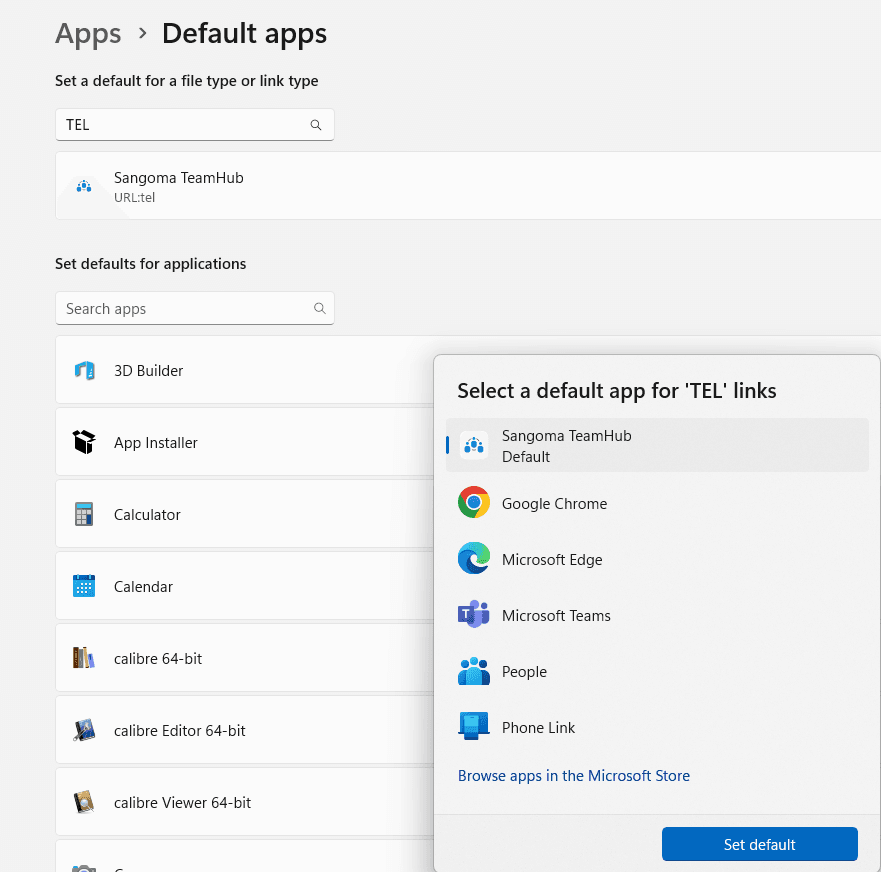
Search for the
TELProtocol- In the search bar under "Set defaults for a file type of link type", type
TEL.
- In the search bar under "Set defaults for a file type of link type", type
-
Set Default for
TELProtocol- Click on the application in the list (Could be Microsoft Teams, or something else).
- Select
Sangoma TeamHub. - Click on
Set Default.