Entering a New Customer
-
Enter in Customer on New Customer Screen a.
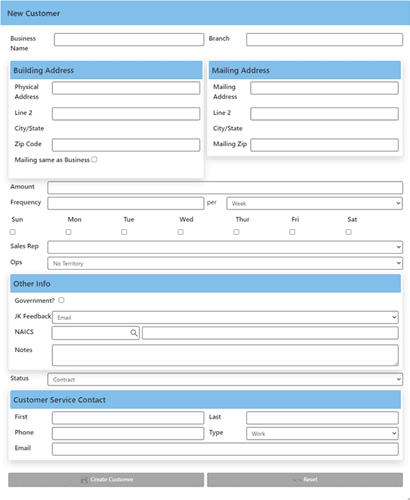 b. Click Create Customer
c. Open created Customer
d. (Franchise, Inspection schedule, and Start Date should be blank)
e. Fill out Other Contact info
b. Click Create Customer
c. Open created Customer
d. (Franchise, Inspection schedule, and Start Date should be blank)
e. Fill out Other Contact info -
Offer Business! a. CS->New Event->Business Offering b.
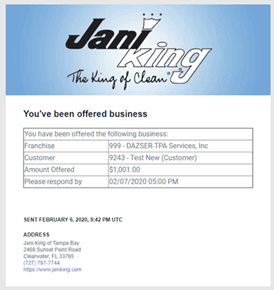 (This has increased 999's business offered by $1001)
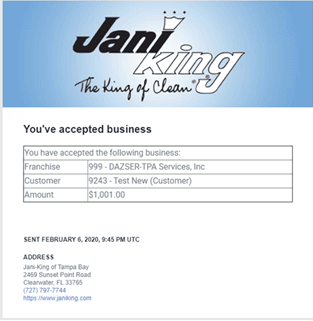
c. Yay, new Business. I accept!
(This has increased 999's business offered by $1001)
c. Yay, new Business. I accept! -
When the business is accepted, enter in the BA a.
 b. It's even got the RMA attached! (payment start is anticipated start date + 1 month (what if start date is on 3/1?) )
c.
b. It's even got the RMA attached! (payment start is anticipated start date + 1 month (what if start date is on 3/1?) )
c. 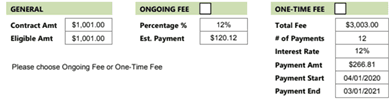 d. GET THE RMA SIGNED!
 -
ONCE THE RMA IS SIGNED AND RETURNED! Enter the Startup Event a. This will set the FO, the Inspection Schedule, and the Start Date
-
The Startup Event will prompt Accounting a. Accounting, go over all information on Accounting Tab b. Email class will send the invoice via email to the Billing Email Address c. If Grouped, group it d. Entering the BA will RESET the FF from whatever it was, back to the Original FF, if this needs to be overridden for any reason, change the Contract to the right percentage (.12 for 12%), then select the override reason! e. Verify the Tax Information! If exempt, make sure you enter ID and Expiry. f. Do any manual invoice